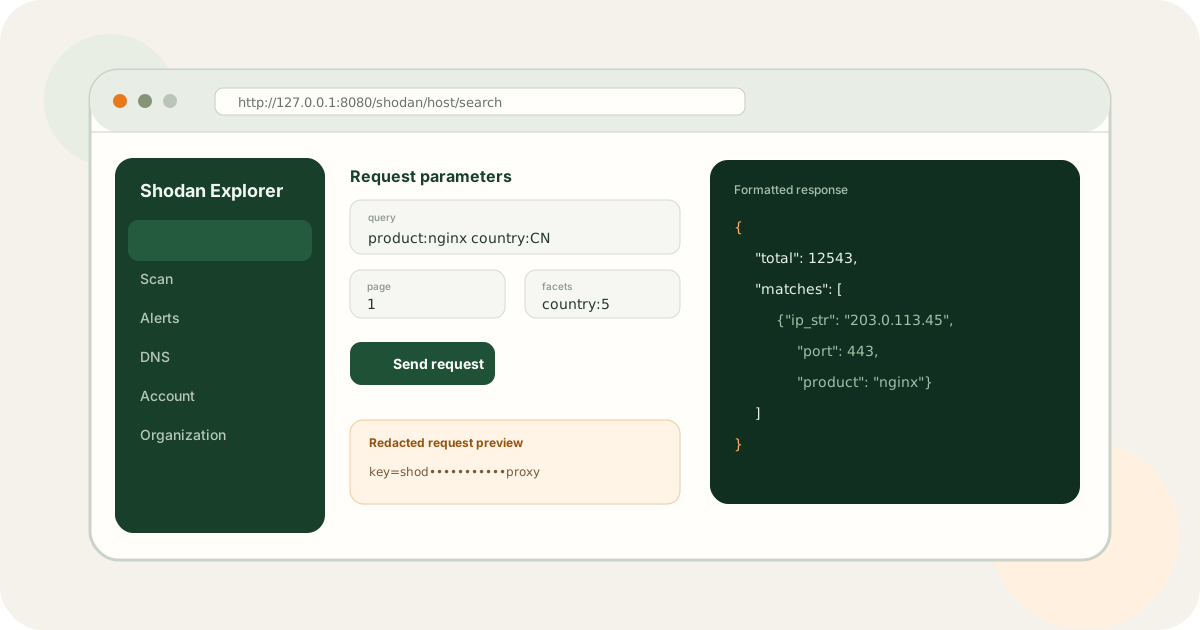
Shodan Explorer is an interactive API documentation workbench, not another public search portal. It turns parameters into forms, previews redacted requests, and offers tree, formatted, and raw response views.
Bottom line
Use a browser to break down an API call when documentation alone is not enough
Explorer helps distinguish parameter errors, path composition problems, permission failures, and response-shape questions by exposing each part of a request in an interactive UI.
Four problems it solves
Interactive parameter forms
Fill query, path, and body parameters without hand-writing the full URL.
Redacted request preview
Inspect paths and parameters before sending without displaying full credentials.
Multiple response views
Switch between tree, formatted, and raw output to inspect nested fields and errors.
Compatible proxy target
Keep the standard base_url + key convention and point requests at Shodan Proxy.
Recommended Docker Compose start
git clone https://github.com/liuweitao/shodan-explorer.git
cd shodan-explorer
cp .env.example .env
cp config/config.example.yaml config/config.yaml
cp config/shodan_keys.example.yaml config/shodan_keys.yaml

docker compose up --build -d
Before starting, add at least one authorized key and review source allowlists, trusted proxies, blocked paths, and administration access. Keep administration on a local or otherwise tightly controlled interface.
Direct Shodan access vs. Proxy
| Mode | Benefit | Risk | Best fit |
|---|---|---|---|
| Direct Shodan | Minimal configuration | The real key enters browser runtime | Local, single-user debugging |
| Shodan Proxy | Server-side keys and source/path controls | Additional service to operate | Shared development and controlled networks |
A safe learning sequence
- 1Confirm the account plan
Inspect API Info, credits, and available capabilities.
- 2Start with minimal parameters
Use a low-impact, read-only request to validate URL, authentication, and response shape.
- 3Add filters and pages gradually
Watch request previews and potential credit consumption.
- 4Move stable calls into code
Use Shodan Skill, an SDK, or your own service for automation.
Technology and coverage
The Vue 3, TypeScript, and Vite interface covers search, on-demand scan, network alerts, notifiers, directory methods, enterprise and organization methods, account data, DNS, tools, and plan information. Proxy blocked_paths may restrict sensitive routes.
Local frontend development uses Node.js 24 and pnpm 11.21. The current complete Compose stack is most direct on linux/amd64.
Project responsibilities
Use the browser UI to explore parameters, fields, and errors.
Skill turns calls into CLI/agent workflows; Proxy centralizes key and access boundaries.
References
This article supports product understanding, development learning, and lawful authorized use. Third-party documentation, software versions, and platform rules may change.
Frequently asked questions
Is Shodan Explorer a public hosted service?
No. It is a self-hosted open-source project intended for a local or controlled development environment. Reassess key exposure and access control before any remote deployment.
Can it connect directly to api.shodan.io?
Yes, but the browser runtime receives the real key. Direct mode is suitable only for local, single-user use. Prefer Shodan Proxy for shared environments.
Why combine it with Shodan Proxy?
Proxy stores real keys server-side, restricts source IPs and paths, and lets Explorer use a placeholder key against a compatible interface.
Does the full Compose stack support ARM?
The Explorer image supports amd64 and arm64, but the currently pinned Proxy v1.0.3 runtime image is amd64-only, so the complete stack is most predictable on linux/amd64.