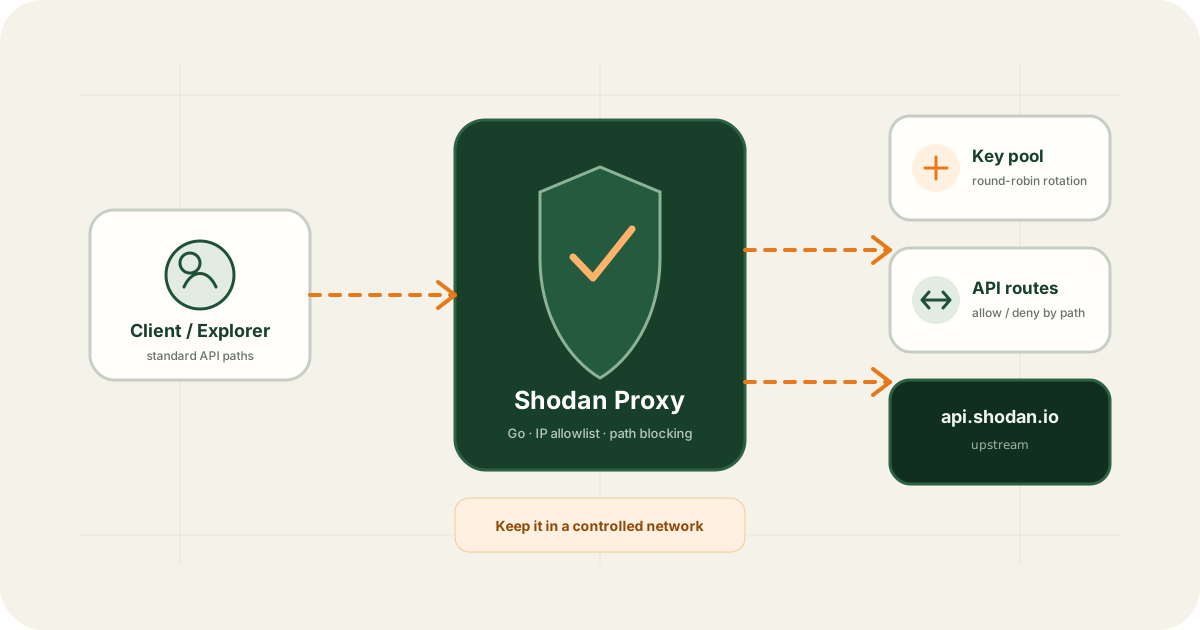
Shodan Proxy is not a public anonymous proxy. It reduces distribution of real keys and adds access boundaries in controlled environments. It sits between clients and Shodan to manage a key pool, source IPs, sensitive paths, and administration.
Bottom line
Use it when several controlled clients need Shodan access without holding production keys
Copying keys into browsers, scripts, test hosts, and many user configurations increases exposure. Proxy preserves Shodan-like request paths while keeping real keys server-side and applying allowlist and path policy.
Six core capabilities
API forwarding
Accept compatible paths and attach server-managed authentication.
Multi-key rotation
Select from configured keys in round-robin order.
IP allowlists
Restrict access to approved internal, VPN, or fixed-egress sources.
Blocked paths
Deny scanning, mutation, enterprise, or other routes that clients do not need.
Authenticated management
Maintain configuration and keys through a separately protected interface.
Docker deployment
Use the Compose entry point in an existing container environment.
Minimal Docker deployment
mkdir shodan-proxy && cd shodan-proxy
curl -O https://raw.githubusercontent.com/liuweitao/shodan-proxy/main/compose.yaml
docker compose up -d
Before starting, review the example configuration and key files:
- Restrict
allowed_ipsto trusted sources. - Match
trusted_proxiesto the real reverse-proxy chain. - Use
blocked_pathsfor scanning, alerts, administration, and other unnecessary routes. - Set a unique management secret and restrict configuration file permissions.
Request and key-selection behavior
Clients do not always need to send real keys. An omitted key or the project's placeholder value selects from the Proxy pool; another explicit key is forwarded as supplied.
| Request | Key used | Use case |
|---|---|---|
No key | Proxy key pool | Controlled clients |
| Project placeholder key | Proxy key pool | Compatible frontends such as Explorer |
| Another explicit key | Client-provided key | Only when deliberately required |
Rotation does not change Shodan permissions, credits, or rate limits. Monitor anonymized metrics, authentication errors, quota exhaustion, and abnormal requests.
Do not expose default configuration publicly
- Expose only necessary business ports and bind administration to a loopback or management-only interface.
- Use TLS and configure trusted proxies correctly.
- Update images and audit allowlists, blocked paths, and unused keys.
- Never emit full keys in responses, access logs, or error tracking.
- Apply stricter path policy to expensive or state-changing endpoints.
Recommended Explorer architecture
Browser → Shodan Explorer → Shodan Proxy → Key Pool → Shodan APIExplorer owns forms, request previews, and response rendering. Proxy owns real keys, source restrictions, and path controls.
Good and bad deployment fits
Internal development, fixed-egress hosts, VPN users, shared API debugging, and unified access for internal scripts.
Anonymous public proxying, bypassing quotas, unauthorized scanning, or environments that cannot maintain access control and secret security.
References
- Shodan Proxy GitHub repository
- Shodan Proxy v1.0.3 release
- Shodan Developer API
- Shodan Explorer GitHub repository
This article supports product understanding, development learning, and lawful authorized use. Third-party documentation, software versions, and platform rules may change.
Frequently asked questions
Can Shodan Proxy bypass Shodan quotas or permissions?
No. It forwards requests, selects configured keys, and applies local controls. Final capabilities and quotas still come from each key's plan and Shodan rules.
Should I expose it directly to the public internet?
No. Use it in a controlled network. Remote access requires strong authentication, TLS, firewall policy, trusted-proxy configuration, strict allowlists, and local or VPN-only administration.
How are multiple keys selected?
The proxy can select keys in round-robin order. It is not a complete quota scheduler, so operators must still monitor each key's state, quota, and errors.
Why pair it with Shodan Explorer?
Explorer can use a placeholder key while the Proxy keeps real keys server-side and enforces source and path rules.